
Vous souhaitez animé du texte en utilisant les langages HTML et CSS ? Alors, je vous invite à découvrir cette animation proposée par Adam Argyle sur CodePen, qui permet d’animer le dégradé de couleur d’un texte.
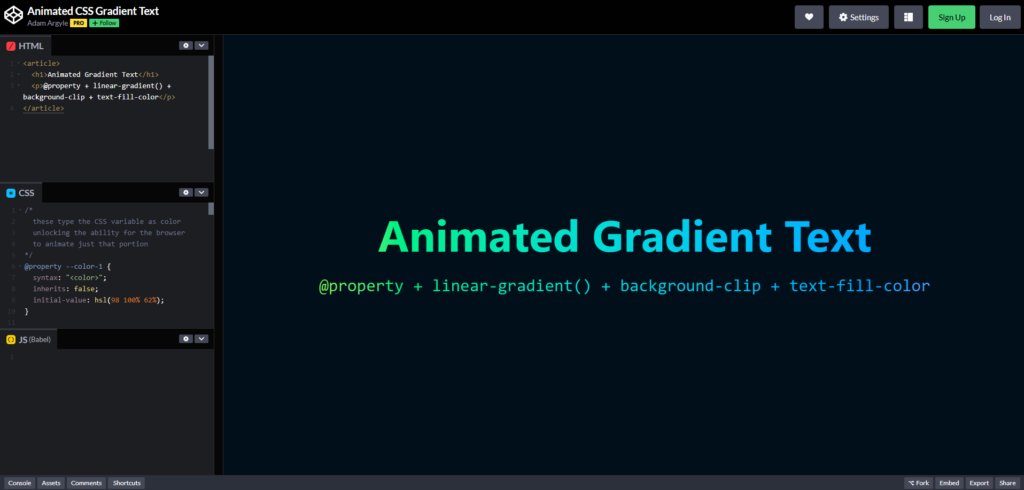
Source : https://codepen.io/argyleink/pen/vEBmZNwhttps://codepen.io/argyleink/pen/vEBmZNw
Télécharger le fichier
Vous pouvez obtenir le fichier en cliquant sur le lien suivant : Animation texte en degrade. (clic droit sur le lien, puis enregistrer sous)
Code HTML
<article>
<h1>Animated Gradient Text</h1>
<p>@property + linear-gradient() + background-clip + text-fill-color</p>
</article>
Code CSS
/*
these type the CSS variable as color
unlocking the ability for the browser
to animate just that portion
*/
@property –color-1 {
syntax: « <color> »;
inherits: false;
initial-value: hsl(98 100% 62%);
}
@property –color-2 {
syntax: « <color> »;
inherits: false;
initial-value: hsl(204 100% 59%);
}
/* keyframes that change the color variable */
@keyframes gradient-change {
to {
–color-1: hsl(210 100% 59%);
–color-2: hsl(310 100% 59%);
}
}
article {
/* apply variable changes over time */
animation: gradient-change 2s linear infinite alternate;
background: linear-gradient(
/*
in oklch produces more vibrant gradient results
learn more https://developer.chrome.com/docs/css-ui/access-colors-spaces#color_interpolation
*/
to right in oklch,
/* use the variables in a gradient (or wherever!) */
var(–color-1),
var(–color-2)
);
/* old browser support */
-webkit-background-clip: text;
-webkit-text-fill-color: transparent;
/* modern browser version */
background-clip: text;
color: transparent;
}
@layer demo.support {
h1 {
font-size: 10vmin;
line-height: 1.1;
}
body {
background: hsl(204 100% 5%);
min-block-size: 100%;
box-sizing: border-box;
display: grid;
place-content: center;
font-family: system-ui;
font-size: min(200%, 4vmin);
padding: 5vmin;
}
h1, p, body {
margin: 0;
text-wrap: balance;
}
h1 {
line-height: 1.25cap;
}
p {
font-family: « Dank Mono », ui-monospace, monospace;
}
html {
block-size: 100%;
}
article {
display: grid;
gap: 1lh;
text-align: center;
}
}
A vous de jouer !
* * Cette case à cocher est obligatoire
*J'accepte